What is MCP?
Model Context Protocol (MCP) is an open standard from Anthropic that lets AI assistants connect to external tools and data through a single interface. MCPBay hosts servers on subdomain.mcpbay.pro that you can plug into any compatible client as a remote MCP server.
All MCPBay servers use the Streamable HTTP transport. That means you only need to paste a URL — no local installation, no stdio setup.
The config format is the same in every client
{
  "mcpServers": {
    "example": {
      "url": "https://example.run.mcpbay.pro/mcp"
    }
  }
}
Here "example" is just one example server, not a connection to all of them at once. Each server is added as its own entry: copy its address from the server's page in the catalog and paste it in place of the example.
Choose your AI client:
- Open Claude Desktop settings: ⌘ + , (macOS) or Ctrl + , (Windows).
- Switch to the "Developer" tab and click "Edit Config" — this opens claude_desktop_config.json.
- Add the server to the mcpServers section (see example below) and save the file.
- Fully restart Claude Desktop. The new server will appear in the tools dropdown under the input field.
The config file lives at:
~/Library/Application Support/Claude/claude_desktop_config.json   # macOS
%APPDATA%\Claude\claude_desktop_config.json # WindowsThe fastest way is the claude mcp add command in your terminal. It edits the correct config (~/.claude.json or .mcp.json in the project root) for you.
claude mcp add example https://example.run.mcpbay.pro/mcpIf you prefer manual edits, the format matches Claude Desktop:
{
  "mcpServers": {
    "example": {
      "url": "https://example.run.mcpbay.pro/mcp"
    }
  }
}
After adding, run /mcp in Claude Code to see connected servers and reload them without restarting the CLI.
Works on any paid ChatGPT plan — Plus, Pro, Team, Enterprise, or Edu. MCP connectors aren't available on the Free plan yet.
- Open Settings → "Apps & Connectors".
- Go to "Advanced settings" and turn on "Developer mode" — you only need to do this once.
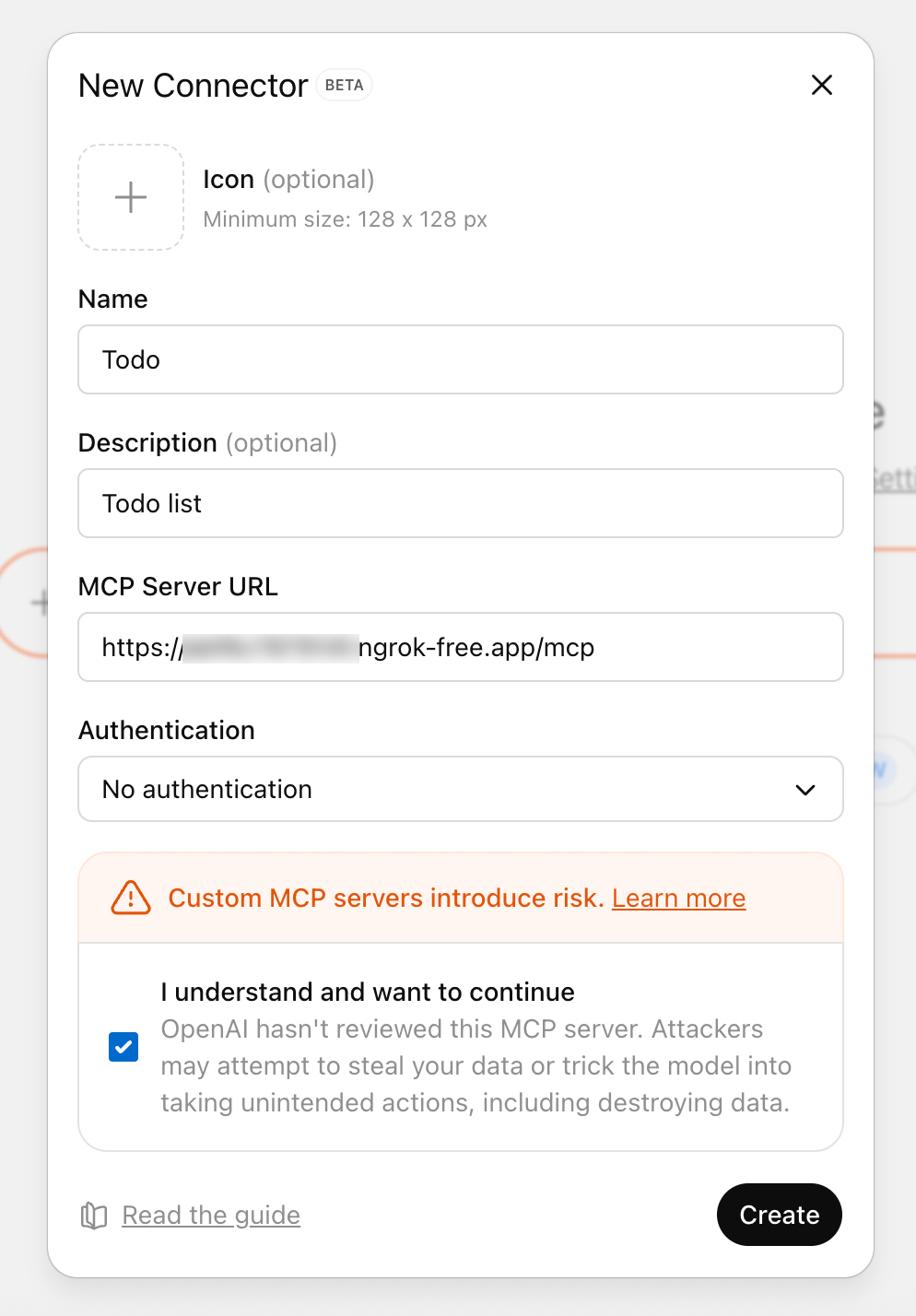
- Go back to "Apps & Connectors" and click "Create".
- Enter any name (e.g. "My server") and paste the server address from its catalog page, e.g. https://example.run.mcpbay.pro/mcp.
- Under "Authentication", pick the auth type. If the MCP server is open and needs no sign-in, leave "No authentication". If the server requires authorization, choose "OAuth". Then click "Create".
- If you chose "OAuth", ChatGPT opens a sign-in window — authenticate there and the connector is ready.
- In a chat, click "+" below the input → pick your connector → ask your question.
Rule of thumb: "No authentication" is only for free, open servers. If a connector won't connect or its tools stay silent, it's almost always because a server that needs authorization was left on "No authentication" instead of "OAuth".
- Open Cursor Settings (⌘ + , on macOS or Ctrl + , on Windows/Linux).
- Go to the "MCP" section in the left sidebar.
- Click "+ Add new MCP server" and paste the JSON config.
- Save — Cursor picks up changes without a restart.
Troubleshooting
Server does not appear in the list
Check JSON syntax (missing or extra commas). Most clients silently ignore a malformed config.
Server appears but tools do not respond
Open the URL in a browser — if you see 404 or a TLS error, the server is unreachable. Reach out to support@mcpbay.pro.
Claude Desktop ignores config changes
The config is only re-read on a full restart. Closing the window is not enough. On macOS use Cmd + Q, on Windows quit from the system tray.
MCP usage tracking
MCPs hosted on MCPBay connect only after you sign in with your mcpbay.pro account — tool calls to such MCPs are attributed to your account automatically. While an MCP stays in your "My MCPs" collection, mcpbay.pro records your tool calls for it: tool name, status and duration — never arguments or content. Removing the MCP from the collection immediately stops recording of free calls; paid-call records are kept as financial history. Raw events are retained for 90 days. MCPs with their own authorization link via a one-time code and are governed by the same collection rule.
How MCPBay checks servers
Every server page has an "MCPBay checks" panel. It lists what the platform actually verified — not a blanket "safe" label. An antivirus scan alone would say little here: MCP threats are usually ordinary-looking code that forwards your data, or hidden instructions in tool descriptions that the AI model reads.
Servers hosted on MCPBay
We build the server ourselves from the author's repository — including private ones — and show which version is running. Every build is checked automatically before release, and critical security issues block it. We also show whether the author has confirmed ownership of the repository and whether the source code is public.
Tool descriptions — every server
The AI model reads tool descriptions before it calls anything, so they can be used for attacks. We check them automatically for known manipulation techniques and re-check them on every update, so a server cannot quietly change its tools after approval.
What these checks do not cover
They are automated checks, not a security audit. For servers not hosted on MCPBay we see only the tool descriptions — not the code and not what the server does with your data. Heuristics catch known techniques, not every possible one. Connect only servers whose authors you trust with the data you pass to them.
Something looks wrong?
If a server behaves suspiciously, write to support@mcpbay.pro with the server page link. A server can be suspended while we investigate.
Ready to start?
Open the catalog and pick a server to connect.
Browse the catalog